Skiplink
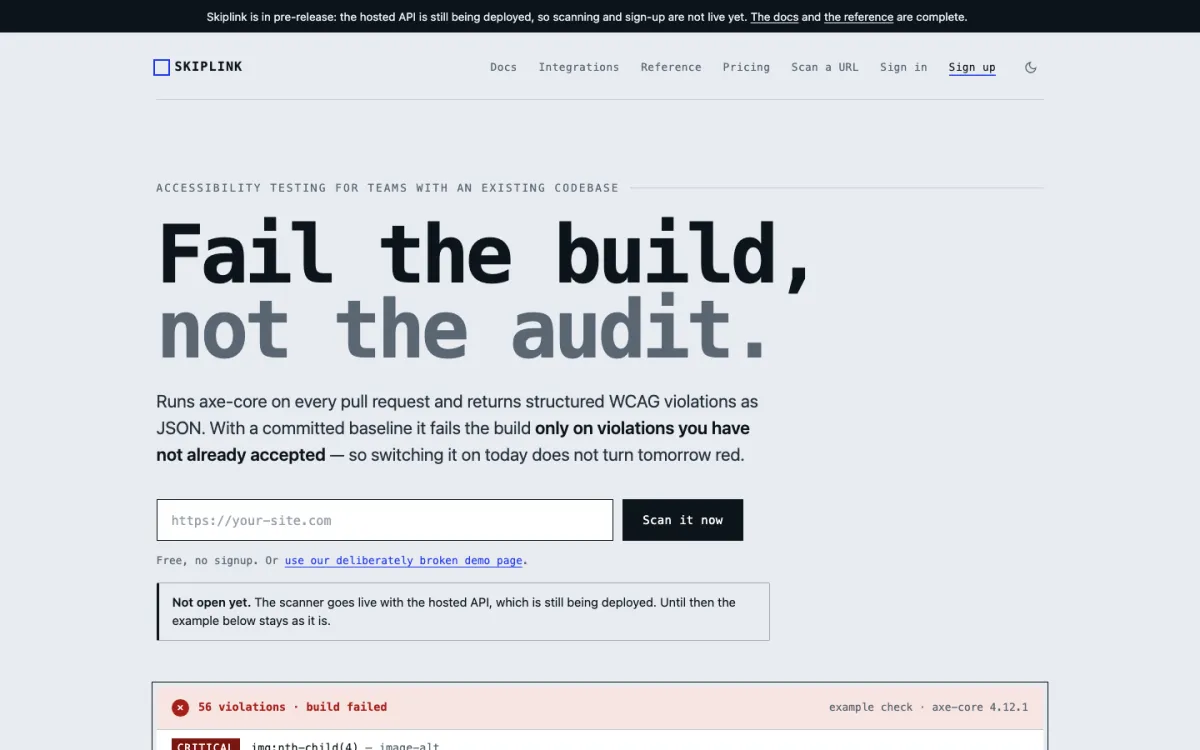
Fail the build, not the audit.
Skiplink is our own accessibility check for pull requests. It runs axe-core in a real browser against your pages and returns every WCAG violation as structured data. With a baseline committed to the repository, it fails the build only on violations you have not already accepted, so switching it on today does not turn tomorrow red.
Launching 1 November 2026. That day the hosted scan API opens, the command-line tool and the test adapters go on npm, and the GitHub Action and the package repositories go public; Product Hunt follows on 3 November. Until then the docs, pricing and WCAG reference are on skiplink.dev (opens in a new tab).
Accessibility check
three pull requests, one baseline-
#212Add product filters
Passed
56 found, all 56 in the baseline
-
#213Swap the hero image
Failed
57 found, 1 new:
image-alton the hero image -
#214Describe the hero image
Passed
56 found, all 56 in the baseline
One pull request, start to finish
Nobody has to open a dashboard. The check runs where the code is reviewed and answers there.
A pull request opens
The GitHub Action starts, or the command-line tool in any other CI system.
The pages are scanned
Unmodified axe-core runs in real Chromium against the preview URLs. Pages behind a login or on
localhostare scanned inside your own Playwright or Cypress tests instead.The engine is pinned
Every result names the axe-core version that produced it, so a finding can be reproduced and an engine upgrade never changes results silently.
New is told from known
Each violation gets a fingerprint that survives a CSS class rename, and is compared with
.skiplink/baseline.jsonin the repository.The build answers
New violations fail it. One comment on the pull request shows the difference and updates itself on every push.
A gate that fails every build on day one gets deleted by Friday. The baseline is what keeps it switched on.
Point any scanner at a site that already has 56 violations and every build fails. Nobody fixes 56 issues to unblock a deploy; they remove the step. A baseline accepts what is already there, so the 57th violation is the one that stops the merge.
Baselines match on the page path, not the hostname, so preview deployments keep matching. Accepting a violation is a commit made with --update-baseline, which someone reviews like any other change.
What no scanner can see
Skiplink says plainly which parts of WCAG a machine can check and which need a person. Here are all 55 Level A and AA success criteria of WCAG 2.2.
- 23
- criteria have at least one automated axe-core rule
- 32
- have none: no scanner will ever report them
- 0
- can be proven met by automation alone
Computed from axe-core 4.12.1's own rule metadata, and published as a reference table on skiplink.dev.
- 1.1.1 Non-text Content, level A: at least one automated rule
- 1.2.1 Audio-only and Video-only (Prerecorded), level A: at least one automated rule
- 1.2.2 Captions (Prerecorded), level A: at least one automated rule
- 1.2.3 Audio Description or Media Alternative (Prerecorded), level A: needs a person
- 1.2.4 Captions (Live), level AA: needs a person
- 1.2.5 Audio Description (Prerecorded), level AA: needs a person
- 1.3.1 Info and Relationships, level A: at least one automated rule
- 1.3.2 Meaningful Sequence, level A: needs a person
- 1.3.3 Sensory Characteristics, level A: needs a person
- 1.3.4 Orientation, level AA: at least one automated rule
- 1.3.5 Identify Input Purpose, level AA: at least one automated rule
- 1.4.1 Use of Color, level A: at least one automated rule
- 1.4.2 Audio Control, level A: at least one automated rule
- 1.4.3 Contrast (Minimum), level AA: at least one automated rule
- 1.4.4 Resize Text, level AA: at least one automated rule
- 1.4.5 Images of Text, level AA: needs a person
- 1.4.10 Reflow, level AA: needs a person
- 1.4.11 Non-text Contrast, level AA: needs a person
- 1.4.12 Text Spacing, level AA: at least one automated rule
- 1.4.13 Content on Hover or Focus, level AA: needs a person
- 2.1.1 Keyboard, level A: at least one automated rule
- 2.1.2 No Keyboard Trap, level A: needs a person
- 2.1.4 Character Key Shortcuts, level A: needs a person
- 2.2.1 Timing Adjustable, level A: at least one automated rule
- 2.2.2 Pause, Stop, Hide, level A: at least one automated rule
- 2.3.1 Three Flashes or Below Threshold, level A: needs a person
- 2.4.1 Bypass Blocks, level A: at least one automated rule
- 2.4.2 Page Titled, level A: at least one automated rule
- 2.4.3 Focus Order, level A: needs a person
- 2.4.4 Link Purpose (In Context), level A: at least one automated rule
- 2.4.5 Multiple Ways, level AA: needs a person
- 2.4.6 Headings and Labels, level AA: needs a person
- 2.4.7 Focus Visible, level AA: needs a person
- 2.4.11 Focus Not Obscured (Minimum), level AA: needs a person
- 2.5.1 Pointer Gestures, level A: needs a person
- 2.5.2 Pointer Cancellation, level A: needs a person
- 2.5.3 Label in Name, level A: at least one automated rule
- 2.5.4 Motion Actuation, level A: needs a person
- 2.5.7 Dragging Movements, level AA: needs a person
- 2.5.8 Target Size (Minimum), level AA: at least one automated rule
- 3.1.1 Language of Page, level A: at least one automated rule
- 3.1.2 Language of Parts, level AA: at least one automated rule
- 3.2.1 On Focus, level A: needs a person
- 3.2.2 On Input, level A: needs a person
- 3.2.3 Consistent Navigation, level AA: needs a person
- 3.2.4 Consistent Identification, level AA: needs a person
- 3.2.6 Consistent Help, level A: needs a person
- 3.3.1 Error Identification, level A: needs a person
- 3.3.2 Labels or Instructions, level A: at least one automated rule
- 3.3.3 Error Suggestion, level AA: needs a person
- 3.3.4 Error Prevention (Legal, Financial, Data), level AA: needs a person
- 3.3.7 Redundant Entry, level A: needs a person
- 3.3.8 Accessible Authentication (Minimum), level AA: needs a person
- 4.1.2 Name, Role, Value, level A: at least one automated rule
- 4.1.3 Status Messages, level AA: needs a person
A rule that fires is good evidence of a failure; a rule that stays quiet proves nothing. image-alt confirms an image has alt text, not that the text describes it. Skiplink is the floor that catches regressions between audits, not a substitute for one.
How it is built
Designed, built and run by ThirteenTabs, and held to the standard it sells.
- Engine
- Unmodified axe-core in headless Chromium, run server-side, in light and dark mode. No rules of our own mixed in.
- Ways in
- A scan API, a GitHub Action, a command-line tool for any CI, and adapters for Playwright and Cypress tests. It also works with your editor.
- Two machines
- The API holds the database and billing keys and never fetches a customer's URL. The scanner fetches strangers' URLs and holds no credentials at all. The split is the security model.
- Checks itself
- Every push scans every page of skiplink.dev with its own engine, tabs through each page to check focus and keyboard traps, and loads it under the production content security policy.
- No overlay
- It reports what is broken and leaves the fixing to you. There is no widget that claims to repair a site with one line of script.
- Pricing
- A free tier of 500 scans a month with no card. Paid plans from $29 a month, priced by scans, with no seats or annual contracts.
Figures on this page come from the WebAIM Million 2026 (an average of 56 detectable failures per home page, which is why the example uses 56) and from Skiplink's own WCAG reference. We publish no usage numbers here.
Want your own site checked?
We run the same scan as an audit: a fix list your developers can act on, and a gate that stops new issues shipping. Send the address and one line about what you need.
hello@thirteentabs.com